

At a glance
The guest calls
It rings at your end
Someone answers, or the voicemail does
Nothing is lost
What happens in each case
Before you start
- A number dedicated to the Cloud API. Meta does not offer calls on numbers connected through the WhatsApp Business app (Case 1, “Coexistence”). If that’s you, calls keep ringing on your phone as before, but EatNow does not see them. To receive them in EatNow, use a dedicated number, such as a virtual number: our team can help you set it up.
- A limit of at least 2,000 customers a day. Meta keeps calls for numbers allowed to message at least 2,000 different customers a day. This limit rises on its own as you keep talking with your guests without reports.
- A valid payment method on your WhatsApp Business account, even though incoming calls are free.
Turn calls on
- Open Settings → Integrations, then Manage on the WhatsApp card.
- Go to the Calls tab.
- Turn on Receive WhatsApp calls.
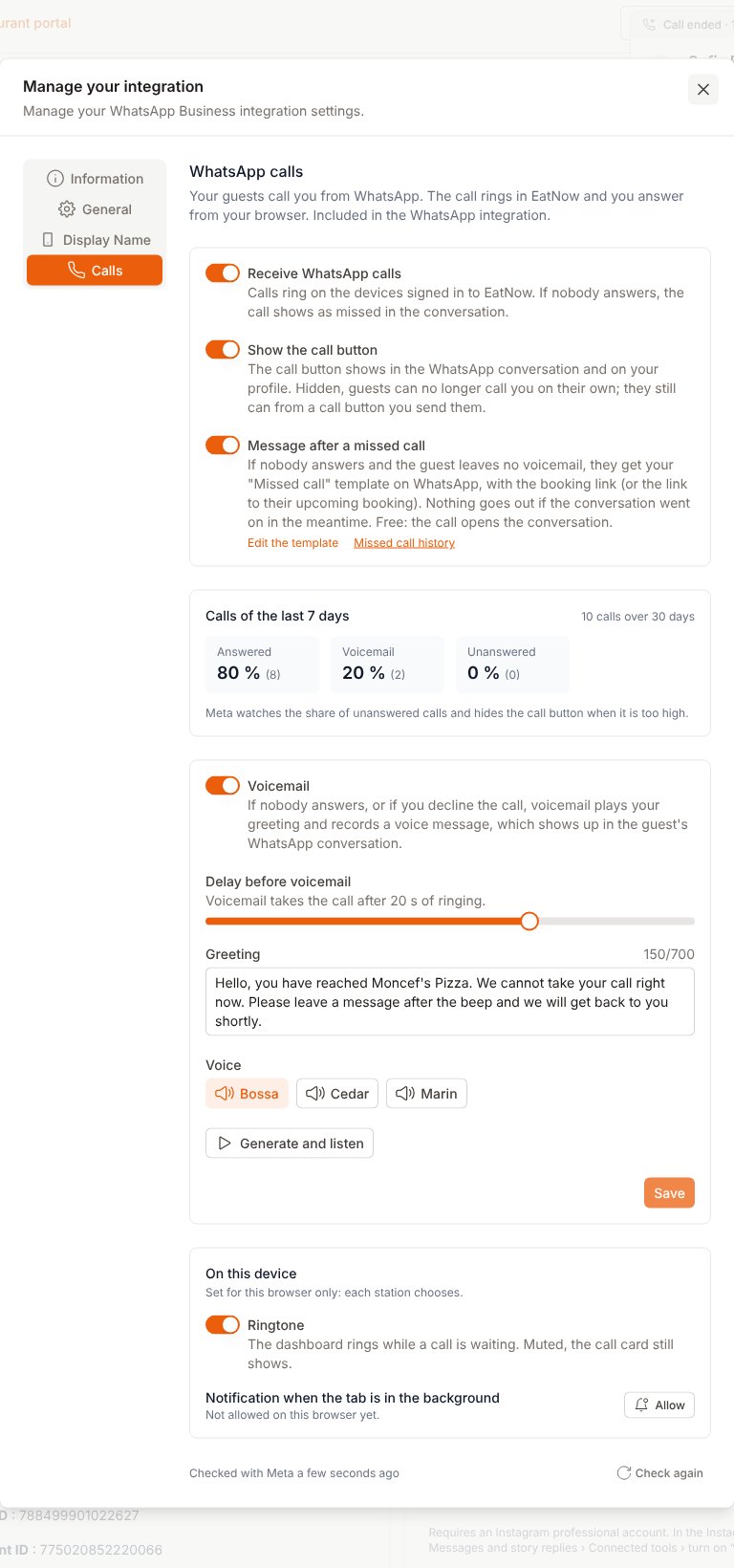
The Calls tab: turning calls on, message after a missed call, statistics and voicemail.
Answer from the dashboard
When a guest calls, a card shows up at the top right of every dashboard page: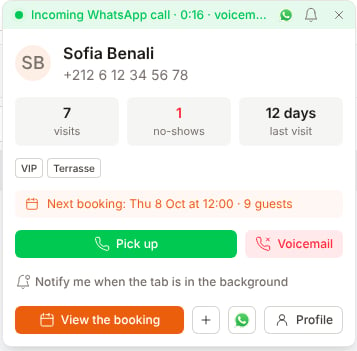
An incoming call card, with the guest's profile and their next booking.
- the guest’s name and number, their visits, no-shows and last visit if they are already a customer;
- their next booking, one click away;
- Pick up, and Voicemail to send them straight to the voicemail (Decline if you have no voicemail);
- shortcuts to note a booking, open the WhatsApp conversation or open the guest’s profile.
Answer from the EatNow app
On phones and tablets, the EatNow app shows the same card and lets you pick up, switch to the loudspeaker, mute the microphone and jot a note on the guest’s profile at the end of the call. During a call, a second call shows as a banner: you can hang up and answer. App closed or phone locked, the call shows on the phone’s own call screen, like a regular phone call:- every phone signed in to the restaurant rings, except those where Ring this phone is off;
- the first one to pick up takes the call, and the others stop ringing;
- declining on the phone’s call screen only stops that phone: the others keep ringing, and the guest is not sent to the voicemail.
Ringtone and notifications on a computer
The dashboard rings while a call is waiting. It stops when someone picks up, when the voicemail takes the call or when the guest hangs up.- Chrome blocks sound until you click in the page. If the card shows Turn the ringtone on, click it: the ringtone then works for every call.
- Tab in the background: allow notifications (button on the card, or the On this device block of the Calls tab). A call then shows even when you’re on another tab, and the EatNow tab title blinks.
- Mute a station: the bell on the card, or the On this device block. It’s a per-browser setting: the till can stay quiet while the front desk rings. The call card still shows.
The voicemail
The voicemail is not on by default, but we strongly recommend it: without it, every call that rings out counts against you at Meta (see below). In the Calls tab, Voicemail section:- Pick the delay before the voicemail takes the call (0 to 30 seconds). At 0, it takes it right away and the call no longer rings in EatNow.
- Write your greeting (700 characters maximum). A text is suggested, with your name and in your language.
- For an English greeting, pick a voice (Marin or Cedar); other languages have their own voice. Then Generate and listen to hear it.
- Save.
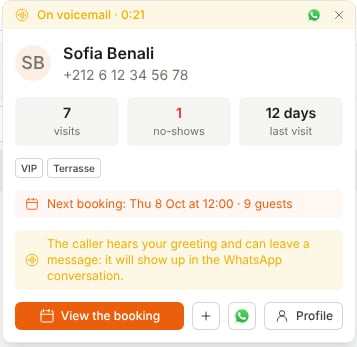
As soon as the voicemail has taken over, the card says so and no longer offers to pick up.
The AI agent on the phone
The AI agent can also pick up: as a fallback, when nobody has answered after a few seconds, or always, instead of the team. It greets the customer, checks availability, books, changes or cancels, answers questions, and passes the rest on to the team. The Who answers card of the Calls tab shows the order: your phones, then the agent, then the voicemail. Settings, test call, calls log and minutes: see The AI agent on the phone.After the call
Every call leaves a trace in the guest’s WhatsApp conversation: an answered call (with its length and who answered), a missed call, or a message left on the voicemail.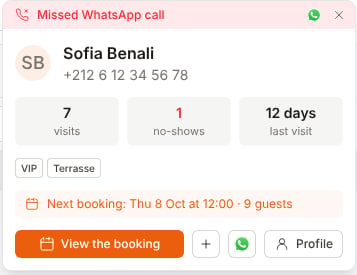
A call nobody took: the card stays up, with shortcuts to follow up.
- someone on the team replies to the guest;
- a later call from the same guest is answered;
- or you mark it as handled (Mark all as handled, or swipe the conversation to Handled in the app).
Message after a missed call
Turn on Message after a missed call in the Calls tab. If nobody answers and the guest leaves no voicemail, they get your Missed call template about 90 seconds after the call, with the booking link (or the link to their upcoming booking). Nothing goes out if the guest wrote to you in the meantime, or if you already replied. A given guest only gets one message every 6 hours, whatever the source of the missed call. It’s free: the call opens the 24-hour conversation window. The history is in Missed calls.Meta alerts
Meta watches the share of calls that go unanswered and guests’ negative feedback (blocks, reports). When it is too high, Meta warns, then sanctions:Frequently asked questions
The Calls tab doesn't show up
The Calls tab doesn't show up
The tab says it's not available with the WhatsApp Business app
The tab says it's not available with the WhatsApp Business app
The tab says my number doesn't have access to calls yet
The tab says my number doesn't have access to calls yet
It doesn't ring on my computer
It doesn't ring on my computer
- Click in the page: Chrome blocks sound until you interact. If the card offers Turn the ringtone on, click it.
- Check that the card’s bell isn’t crossed out, and that Ringtone is on in the On this device block.
- Check that the computer’s volume isn’t muted. The call card always shows, even without sound.
It doesn't ring in the app when it's closed
It doesn't ring in the app when it's closed
I pick up but the guest can't hear me
I pick up but the guest can't hear me
Two people pick up at the same time
Two people pick up at the same time
Can I call the guest back?
Can I call the guest back?
Can I transfer the call to another phone?
Can I transfer the call to another phone?
Are video calls supported?
Are video calls supported?
How much does it cost?
How much does it cost?