
It asks
After each visit, EatNow sends your guest a message (email and/or WhatsApp) asking them to rate their experience.
It filters
Only guests who give 5 stars are sent to Google or TripAdvisor. Everyone else lands on a private form only you can see.
It centralises
Google reviews, TripAdvisor reviews and private feedback all sit in one page — with an AI assistant to write your replies.
The full journey, step by step
1
Your guest dines at your restaurant
The reservation is marked as arrived or finished in EatNow (seated, showed up, done…).
2
EatNow waits, then asks
After the delay you choose (24 hours by default), your guest receives a short message with five clickable stars.
3
The guest gives a rating
They tap a star on their phone. That single tap decides what happens next.
4
5 stars → public review
The guest is sent straight to your Google (or TripAdvisor) page to post their review publicly.
5
1 to 4 stars → private feedback
The guest is invited to explain what went wrong. The comment stays inside EatNow, and you’re notified.
6
You reply
From Reviews, you answer your Google reviews and your private feedback — with AI-generated drafts you can edit.
Nothing is ever posted publicly on your behalf. A public review is always written by the guest, on the platform, from their own account.
Where everything lives
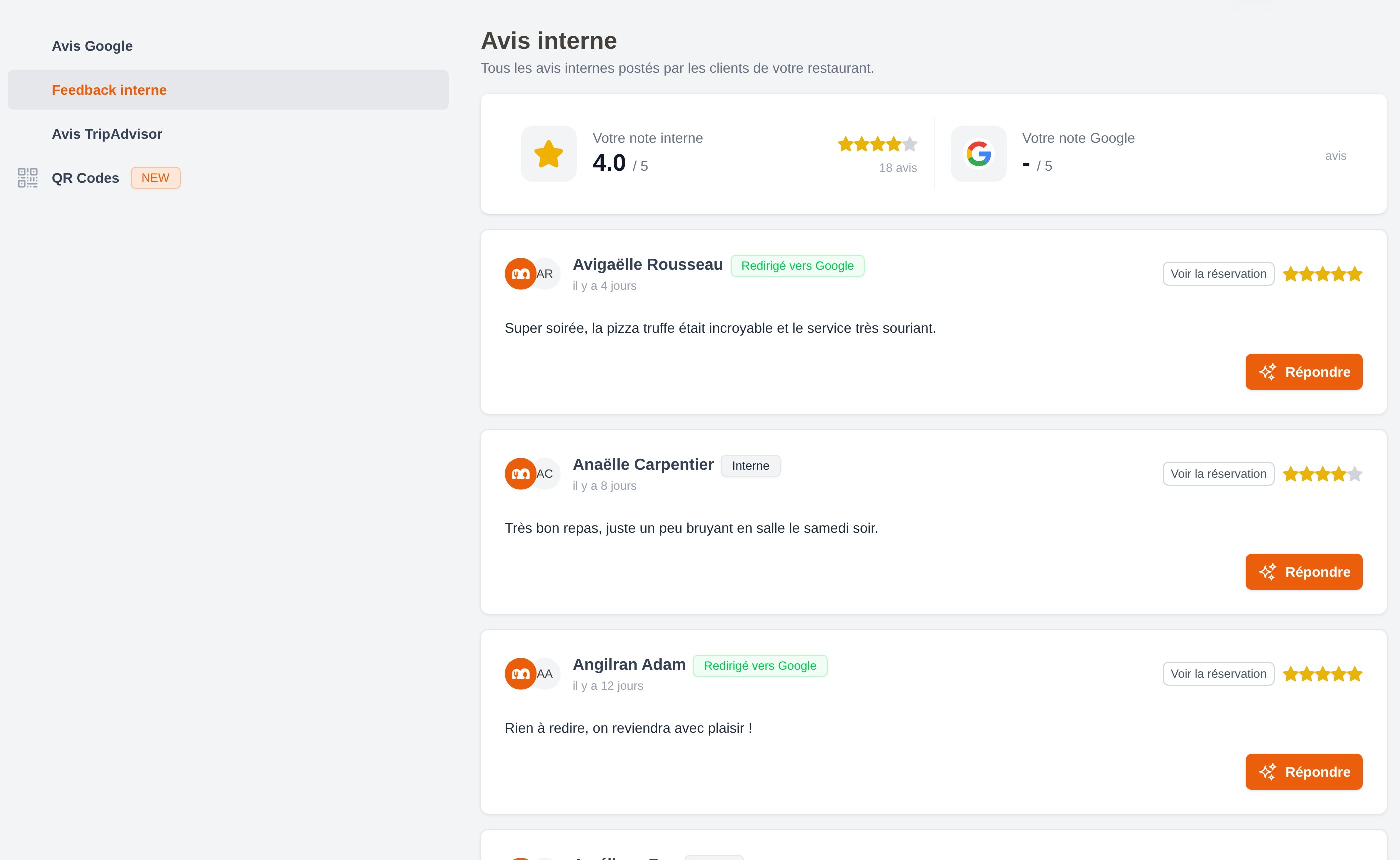
The Reviews page brings your Google reviews, private feedback, TripAdvisor reviews and QR codes together.
Three ways to collect a review
Email follow-up
Sent automatically after the visit to guests who have an email address.
WhatsApp follow-up
Sent automatically to guests who have a phone number, if your WhatsApp integration is active.
QR codes
Printed on your tables or at the counter, for walk-ins and guests without a reservation.
What you need to get started
To collect private feedback only
To collect private feedback only
Nothing at all. Internal reviews are enabled by default — you only need to switch on the follow-up message.
To send 5-star guests to Google
To send 5-star guests to Google
A Google My Business integration connected in Settings > Integrations > Integrations list, with your restaurant listing selected.
To send 5-star guests to TripAdvisor
To send 5-star guests to TripAdvisor
A TripAdvisor integration connected in Settings > Integrations > Integrations list.
To send the follow-up on WhatsApp
To send the follow-up on WhatsApp
An active WhatsApp integration and a WhatsApp template of the Follow-up type approved by Meta. See WhatsApp templates.
Who can do what
Access to reviews is controlled by two permissions, set per collaborator role in Settings > Collaborators:Next steps
Set up the review request
Choose when the message goes out and on which channels.
Understand the filter
Exactly how EatNow keeps bad reviews off Google.
Reply to your reviews
Use the AI assistant to answer in seconds.
Track your results
Reviews generated, negative reviews intercepted, conversion rate.