
- A unique booking link — the prescriber books for the customer themselves, and the reservation is tagged automatically.
- Manual association — you set the reservation’s source to Prescriber / Agency and pick the prescriber yourself (handy for phone bookings or walk-ins).
Create a prescriber
1
Open the prescribers page
Go to Settings → Prescribers.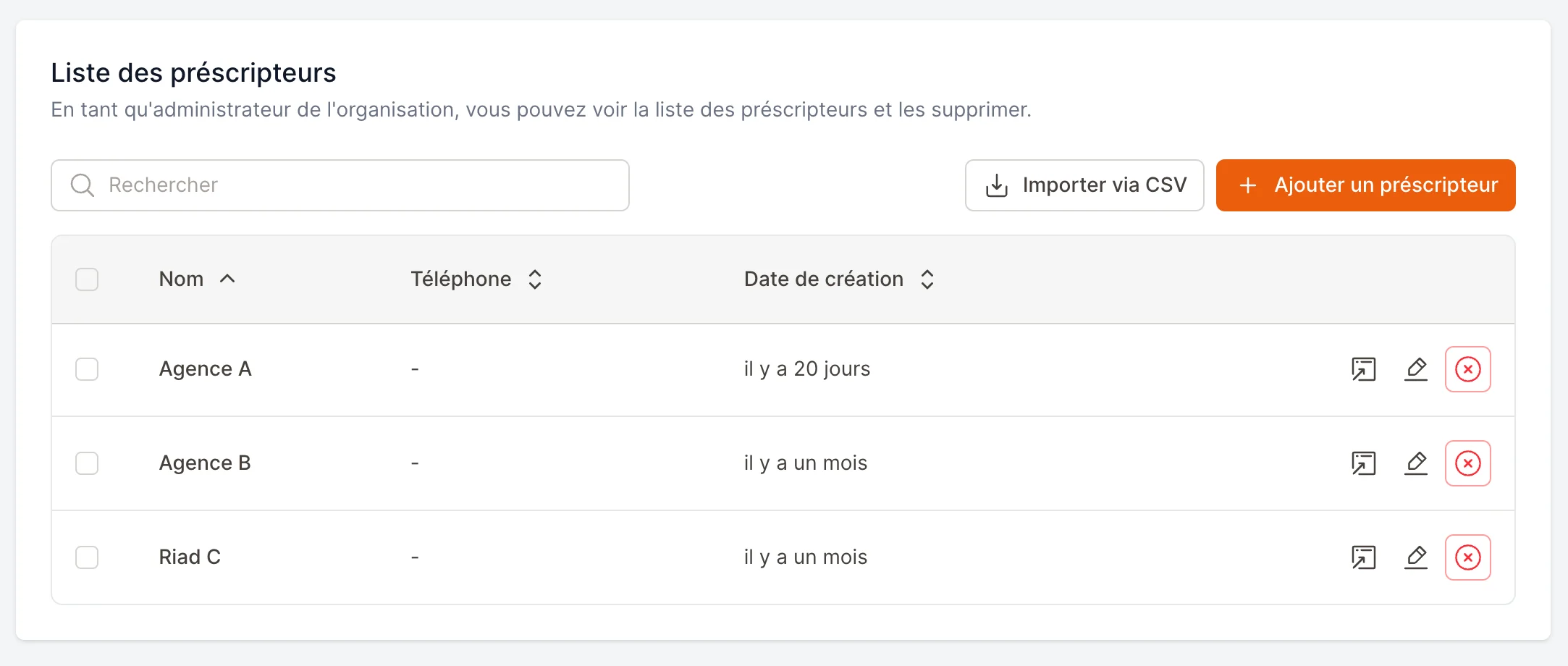
2
Add a new prescriber
Fill in the form:
- Prescriber name (required) — e.g. a travel agency or guide.
- Phone number (optional) — to reach the partner.
- Has discounts (optional) — when enabled, the prescriber can see the promotions available on the relevant time slots.
- Groups (optional) — to reserve an offer for several partners at once (see below).
- Sees public products (on by default) — turn it off if the offer you reserve for this partner should replace your public catalog rather than add to it.
Archiving a prescriber
When a partnership ends, archive the prescriber: they disappear from lists and pickers, and their link stops unlocking the offers reserved for them — it becomes an ordinary public link again, and bookings made through it are no longer attributed to them. Everything they did is kept: their reservations, activities and retro-commission history stay intact. They even keep appearing in the report as long as the displayed period contains one of their bookings, so you can settle what you still owe them after the partnership ended. A Restore button brings them back at any time. The Show archived switch above the table lists archived prescribers.Prescribers cannot be deleted for good, and that is deliberate: a delete would detach the prescriber from every past reservation, and the revenue they brought you would vanish from your reports.
Method 1 — A unique booking link
Each prescriber has their own booking link. Reservations made through it are automatically associated with that prescriber — no manual step required.1
Copy the prescriber's link
In the prescribers list, each row has a link icon. Click it and choose Copy reservation link for this prescriber.You’ll also find this link inside the prescriber’s edit form, under Special reservation link, with a copy button next to it.
If you also use Activities, the same menu offers Copy activity link for this prescriber for a dedicated activity-booking link.
2
Send it to the concierge
Share the link with your partner (by message, email, etc.). It opens your normal online booking form for them.
3
They book — you get the credit
Every reservation the concierge makes through that link is automatically tagged to their prescriber profile. Nothing else to do on your side.
Method 2 — Manual association
Use this for reservations that don’t come through the link — a phone call, a walk-in, or a booking you’re editing after the fact.1
Open or create a reservation
In the reservation form (new booking or editing an existing one), find the Booking source field.
2
Set the source to “Prescriber / Agency”
Choose Prescriber / Agency in the Booking source list. A new field appears underneath.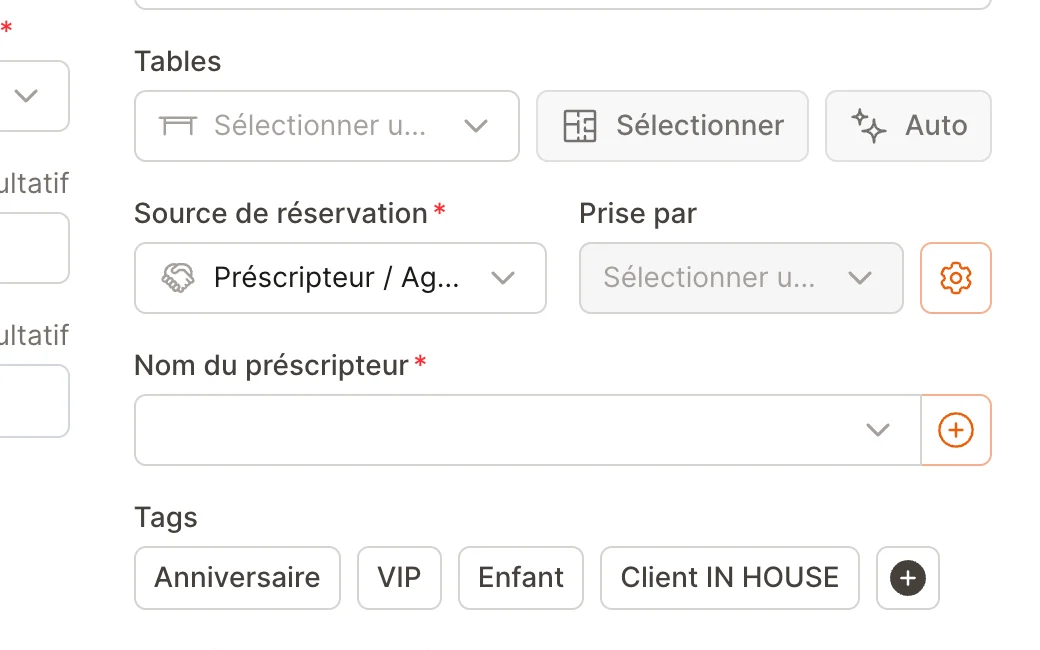
3
Pick the prescriber
In the Prescriber name field, search for and select the right prescriber. Don’t see them yet? Use the + button to create one on the spot, without leaving the form.Save the reservation — it’s now attributed to that prescriber.
The Prescriber name field only shows up once the source is Prescriber / Agency, and it’s required for that source — a prescriber reservation must point to a prescriber.
Reserve an offer for a prescriber
You often negotiate an offer specific to a partner — a menu at an agreed rate, a package no other customer should see. EatNow lets you reserve a prepaid product for a prescriber or a group of prescribers: the product stays entirely invisible on the public portal and only shows up for the targeted partners, through their booking link.1
Create the product as usual
Nothing special here: create your prepaid product (and its variants) in your catalog, then add it to the relevant service.
2
Set its visibility to “Prescribers only”
In the service, click the product’s edit icon. The Visibility field offers three choices:
- Public — the product is visible to every customer (the default).
- Internal only — the product is never visible to customers; your team can still sell it from the back office.
- Prescribers only — the product only appears for the targeted prescribers.
3
Choose who benefits
Once “Prescribers only” is selected, set the target:
- No selection — the offer is available to every prescriber of yours.
- One or more groups — handy when several partners share the same deal.
- Named prescribers — to target a few partners specifically.
Create prescriber groups
From Settings → Prescribers, the Groups button lets you create groups and put your prescribers in them. A prescriber can belong to several groups. Groups save you from re-selecting twenty agencies for every new offer.Replace the public catalog instead of extending it
By default a prescriber sees both the public products and the offers reserved for them. If your deal says the partner should sell only your dedicated offer, turn off Sees public products on their record: they will then only see the products reserved for them, extras included.Reserved offers are never reachable other than through the relevant prescriber’s link: they appear neither on the public portal nor in the partner API, and the WhatsApp AI agent never offers them. Your team can still sell them from the back office.
Track your prescribers
See, for any period, how many reservations and covers each prescriber has brought you.1
Open the “By prescriber” tab
Go to Customers and open the By prescriber tab.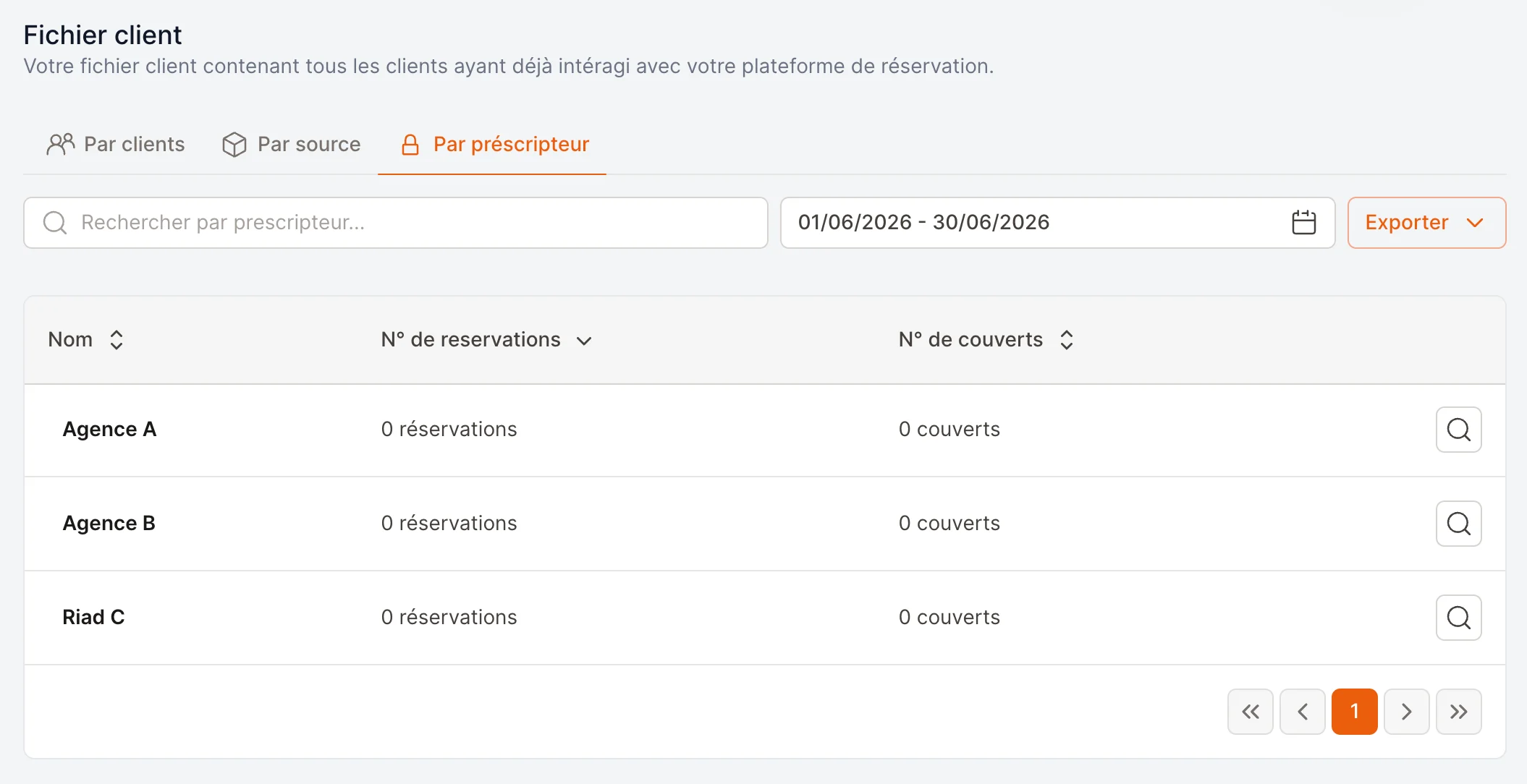
2
Choose a period
Pick a date range (it defaults to the current month). You can also search by prescriber name.
3
Read the numbers
The table shows, per prescriber:
- N° of bookings — how many reservations they brought, plus activities if there are any.
- N° of guests — the total covers, reservations and activities combined.
- Value sold — the value of the products sold in the period, with the share already collected online.
Working out a retro-commission
A prescriber’s Retro-commission tab gives the period’s basis, product by product: quantity sold, value sold, amount collected online, amount pending and refunds. Offers reserved for them carry a Reserved offer badge, so you can see at a glance what the negotiated deal brought in. EatNow does not compute the commission itself: every agreement has its own percentage, so the tool provides the amounts and you apply your rate.A few things to know when reconciling the figures:
- Value sold is the full price of the products, even when only a share was collected online (a 30% deposit, the rest at the table).
- A product settled on site counts towards value sold, but not towards the amount collected online.
- Booking deposits are shown separately: they are no-show guarantees, not sales.
- Refunds are excluded from the basis and shown on their own.
- Amounts are grouped per currency, with no conversion.
- A sale is attributed to the service date, not the payment date.
Frequently asked
Do I have to create the prescriber before sending the link?
Do I have to create the prescriber before sending the link?
Yes. The unique link points to an existing prescriber profile, so create the prescriber first, then copy and share their link.
Can I change a reservation's prescriber afterwards?
Can I change a reservation's prescriber afterwards?
Yes. Edit the reservation, keep the source on Prescriber / Agency, and pick a different prescriber in the Prescriber name field.
What does “Has discounts” do?
What does “Has discounts” do?
When enabled, the prescriber can see the promotions available on the relevant time slots when booking through their link.
A teammate can't see the prescriber fields — why?
A teammate can't see the prescriber fields — why?
Attributing reservations to prescribers and managing the prescribers list are governed by permissions. Ask an administrator to grant the matching prescriber permissions to that collaborator’s role.