> ## Documentation Index
> Fetch the complete documentation index at: https://docs.eat-now.io/llms.txt
> Use this file to discover all available pages before exploring further.
# Waitlist overview
> Stop losing guests when a slot is full — capture the demand, and turn every cancellation into a filled table automatically.
When a time slot is fully booked, guests usually bounce to another restaurant — and when someone cancels an hour later, that table stays empty. The **waitlist** fixes both: full slots show a **"Join the waitlist"** button on your booking portal instead of a dead end, and freed spots are offered to waiting guests, automatically or by you.
## What it's for
* **Capture demand you'd otherwise lose.** A full slot is no longer a "no": guests leave their name, party size and contact details in a few seconds.
* **Fill cancellations and no-shows automatically.** When a reservation is cancelled, rejected, deleted, marked as a no-show, moved or reduced — from any channel (dashboard, booking portal, Google, WhatsApp agent, partner API, your till) — the waitlist wakes up and the freed spot is offered to the queue.
* **Measure real demand.** Ten people on the 8:00 PM waitlist every Friday is a strong signal — maybe it's time to open more tables, add a second seating or raise the slot's capacity.
* **Keep control.** You decide per shift whether the waitlist is on, how many guests can queue per slot, and whether spots are re-offered automatically or only by your team.
## How a guest experiences it
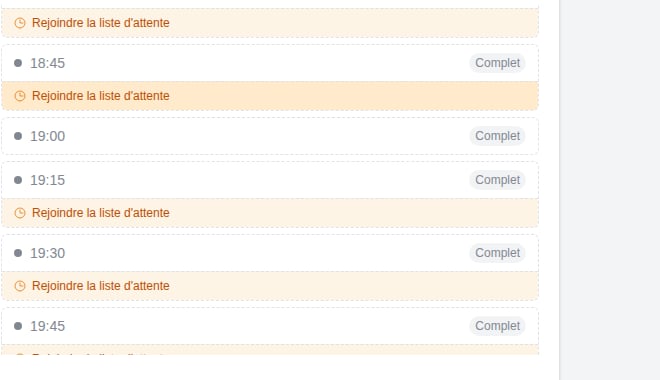 On a full slot, the portal shows **Join the waitlist** instead of blocking the booking. The guest fills the usual details (name, phone, email, party size) — it takes under a minute.
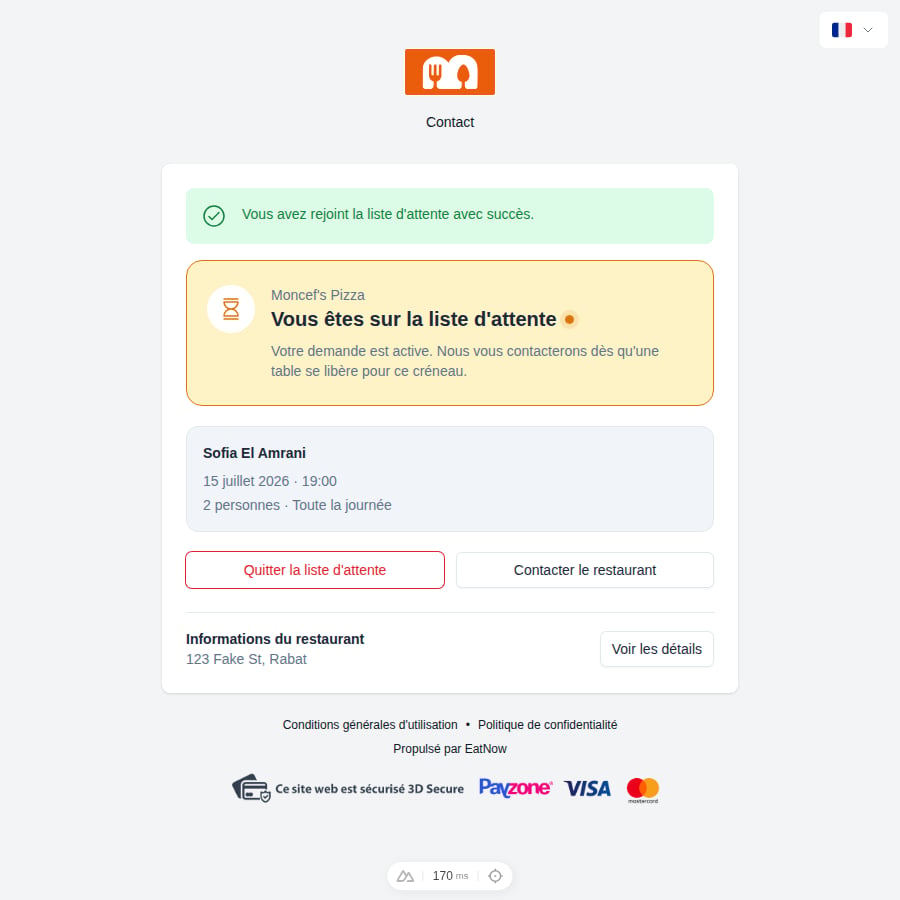
An email (and WhatsApp, if connected) confirms they're on the list — and makes clear **it's not a reservation yet**. A personal link lets them track or cancel their request at any time.
When a table frees up, the guest receives a **"A spot just opened up"** message with one button: **Confirm my spot**. Depending on your settings this goes to everyone at once, or one guest at a time in queue order.
The guest confirms within the stated window (a countdown shows on their tracking page), the reservation is created, and they receive the usual confirmation with a calendar invite. From that point on it behaves like any other booking.
On a shift with prepaid formulas, a deposit or a card imprint, **nothing is collected when joining** — the guest picks their formula, but payment (or the card imprint) is only requested when they confirm an offered spot. Their tracking page states what is owed, and when, at every step.
On a full slot, the portal shows **Join the waitlist** instead of blocking the booking. The guest fills the usual details (name, phone, email, party size) — it takes under a minute.
An email (and WhatsApp, if connected) confirms they're on the list — and makes clear **it's not a reservation yet**. A personal link lets them track or cancel their request at any time.
When a table frees up, the guest receives a **"A spot just opened up"** message with one button: **Confirm my spot**. Depending on your settings this goes to everyone at once, or one guest at a time in queue order.
The guest confirms within the stated window (a countdown shows on their tracking page), the reservation is created, and they receive the usual confirmation with a calendar invite. From that point on it behaves like any other booking.
On a shift with prepaid formulas, a deposit or a card imprint, **nothing is collected when joining** — the guest picks their formula, but payment (or the card imprint) is only requested when they confirm an offered spot. Their tracking page states what is owed, and when, at every step.
 ## The five statuses
| Status | Meaning |
| ------------- | --------------------------------------------------------------------------------------------------------- |
| **Waiting** | In the queue. No table is promised yet. |
| **Offered** | A spot has been proposed — waiting for the guest (or your team) to confirm. |
| **Confirmed** | Converted into a real reservation. Done. |
| **Expired** | The offer window passed without an answer, or the slot has already started. You can reactivate the entry. |
| **Cancelled** | The guest left the queue (or your team removed them). |
## Where you see it
* The **Reservations list** gains a **Waitlist tab** (with a live counter) on any day where a shift has the waitlist enabled.
* The **Planning** view shows a dedicated waitlist lane, so you see waiting guests next to your seated reservations.
* On mobile, the view switcher badge tells you at a glance how many guests are waiting today.
The waitlist is configured **per shift** — enable it only for the services where it makes sense (Friday dinner, Sunday brunch…). See [Setting up the waitlist](/waitlist/setup).
## The five statuses
| Status | Meaning |
| ------------- | --------------------------------------------------------------------------------------------------------- |
| **Waiting** | In the queue. No table is promised yet. |
| **Offered** | A spot has been proposed — waiting for the guest (or your team) to confirm. |
| **Confirmed** | Converted into a real reservation. Done. |
| **Expired** | The offer window passed without an answer, or the slot has already started. You can reactivate the entry. |
| **Cancelled** | The guest left the queue (or your team removed them). |
## Where you see it
* The **Reservations list** gains a **Waitlist tab** (with a live counter) on any day where a shift has the waitlist enabled.
* The **Planning** view shows a dedicated waitlist lane, so you see waiting guests next to your seated reservations.
* On mobile, the view switcher badge tells you at a glance how many guests are waiting today.
The waitlist is configured **per shift** — enable it only for the services where it makes sense (Friday dinner, Sunday brunch…). See [Setting up the waitlist](/waitlist/setup).