> ## Documentation Index
> Fetch the complete documentation index at: https://docs.eat-now.io/llms.txt
> Use this file to discover all available pages before exploring further.
# Pacing
> Smooth out the flow of arrivals so your kitchen and host stand aren't overwhelmed by everyone booking the same time slot.
Having enough seats doesn't mean you can seat everyone at once. **Pacing** caps how many guests arrive in each time slot, independently of your total capacity — so the kitchen and the host stand stay in control.
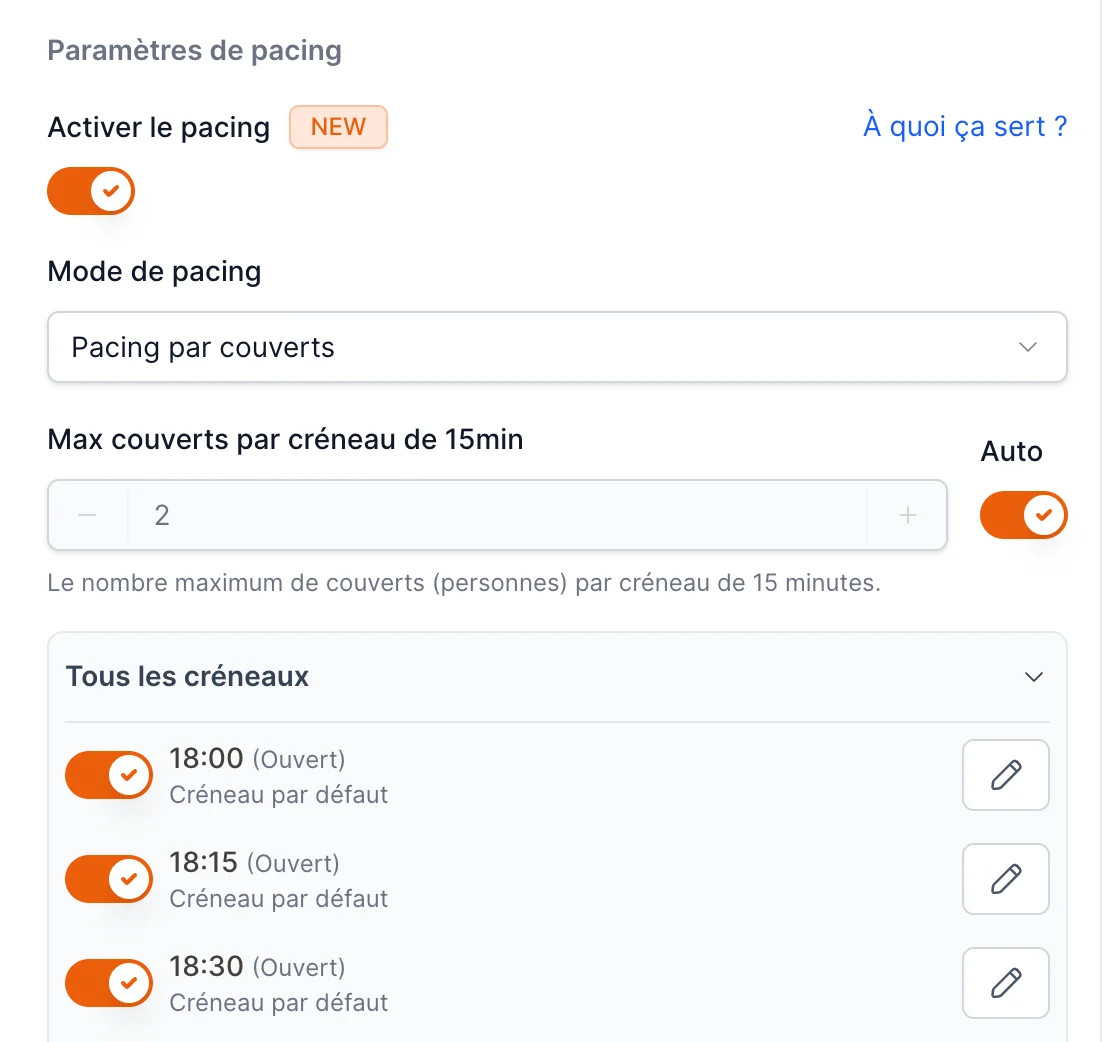
Pacing is in the **Pacing settings** card on the **Advanced** tab. Turn on **Enable pacing** to reveal the options.
## Why use pacing?
You can seat 100 people across the night, but if 60 of them book 8:00 PM, the kitchen drowns and guests wait. Pacing spreads arrivals out — for example, **no more than 20 guests every 15 minutes** — so service stays smooth even when you're fully booked.
## Reservations or covers?
The **Pacing mode** decides what the limit counts.
| Mode | The per-slot limit counts… | Example |
| -------------------------- | ---------------------------------------------- | ------------------------------------------------------------------------- |
| **Pacing by covers** | The number of **people** | Max 20 covers at 19:00 — a party of 8 uses 8 of them |
| **Pacing by reservations** | The number of **bookings**, regardless of size | Max 5 reservations at 19:00 — a couple and a party of 8 each count as one |
## Max per slot
Set the maximum allowed in each slot:
* **Auto** — let the system spread your capacity evenly across the shift. Easiest starting point.
* **Manual** — turn Auto off to enter your own **max per slot** (covers or reservations, depending on the mode).
 ## Fine-tuning individual slots
For full control, the **advanced pacing** configuration lets you set a different limit for each time slot — and even close specific slots. Handy when, say, 7:00–8:00 PM is your crunch and you want fewer arrivals then, but more later in the evening.
## FAQ
**How is pacing different from total capacity?**
**Capacity** is how many you can seat in total across the shift. **Pacing** is how many can *arrive at the same time*. You can be well under capacity for the night yet still hit a pacing limit at a popular slot.
**A slot shows as unavailable even though I have free tables — why?**
It has likely hit its pacing limit. Raise the max per slot (or switch off pacing) if you want to accept more arrivals at that time.
## Fine-tuning individual slots
For full control, the **advanced pacing** configuration lets you set a different limit for each time slot — and even close specific slots. Handy when, say, 7:00–8:00 PM is your crunch and you want fewer arrivals then, but more later in the evening.
## FAQ
**How is pacing different from total capacity?**
**Capacity** is how many you can seat in total across the shift. **Pacing** is how many can *arrive at the same time*. You can be well under capacity for the night yet still hit a pacing limit at a popular slot.
**A slot shows as unavailable even though I have free tables — why?**
It has likely hit its pacing limit. Raise the max per slot (or switch off pacing) if you want to accept more arrivals at that time.