> ## Documentation Index
> Fetch the complete documentation index at: https://docs.eat-now.io/llms.txt
> Use this file to discover all available pages before exploring further.
# Tracking your results
> Reviews generated, negative reviews intercepted, conversion rate — see exactly what the feature is bringing you.
Go to **Dashboard** in the left sidebar, then open the **E-Reputation** tab. Everything on this page follows the date range picker at the top right (and compares it to the previous period).
## The four headline numbers
 | Indicator | What it counts |
| -------------------------------- | ---------------------------------------------------------------------- |
| **Reviews generated** | Guests sent to Google or TripAdvisor to post a public review |
| **Negative reviews intercepted** | Ratings of 4 stars or less that stayed private instead of going public |
| **Conversion rate** | Ratings received ÷ follow-up messages sent |
| **Average internal rating** | The average of every rating collected over the period |
**Negative reviews intercepted** is the number to show your team. Each one is a 1, 2, 3 or 4-star review that would have landed on your public page.
## Reviews generated over time
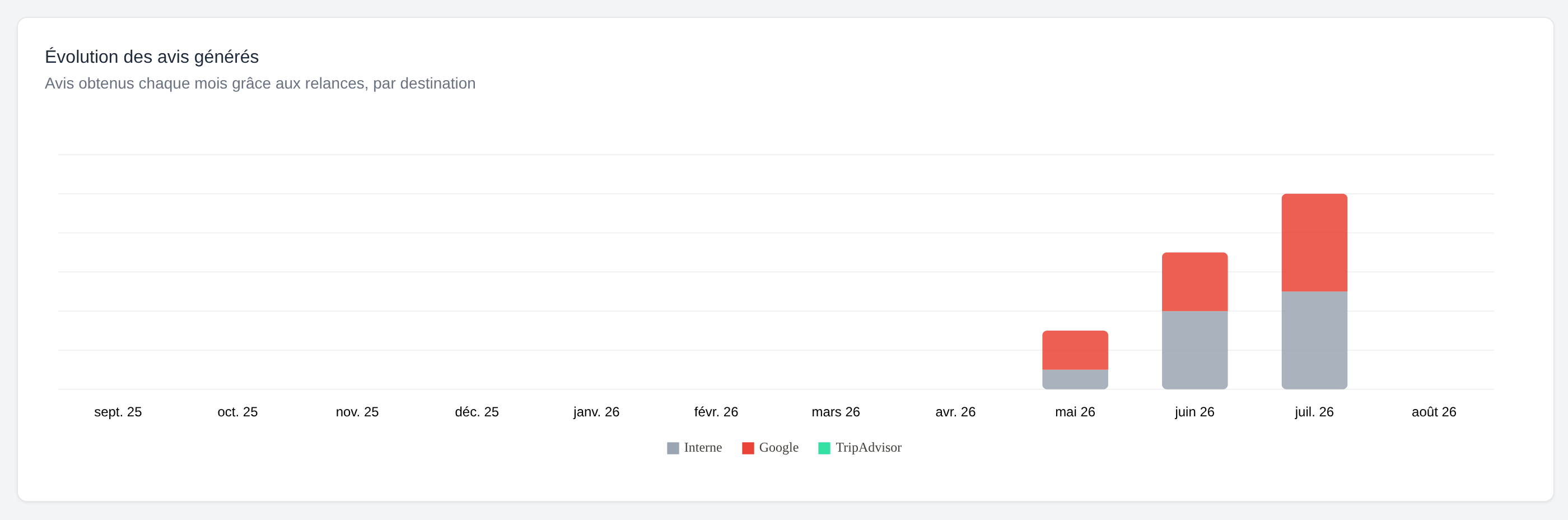
A monthly bar chart splitting the reviews you collected by destination: **Internal**, **Google**, **TripAdvisor**.
| Indicator | What it counts |
| -------------------------------- | ---------------------------------------------------------------------- |
| **Reviews generated** | Guests sent to Google or TripAdvisor to post a public review |
| **Negative reviews intercepted** | Ratings of 4 stars or less that stayed private instead of going public |
| **Conversion rate** | Ratings received ÷ follow-up messages sent |
| **Average internal rating** | The average of every rating collected over the period |
**Negative reviews intercepted** is the number to show your team. Each one is a 1, 2, 3 or 4-star review that would have landed on your public page.
## Reviews generated over time
A monthly bar chart splitting the reviews you collected by destination: **Internal**, **Google**, **TripAdvisor**.
 ## Your Google reviews over time
The total number of reviews on your Google listing, tracked day after day. This is the curve that shows whether your public reputation is actually growing.
EatNow records your Google total once a day (early morning), so this chart starts building the day you connect Google. On a fresh integration it will say *"Collecting data — history is building up day by day."* — that's normal.
TripAdvisor doesn't publish those totals, so there is no equivalent chart for it.
## Rating distribution
How many 1, 2, 3, 4 and 5-star ratings you collected over the period, in a simple bar per rating. A cluster on 3 stars tells you something very different from a spread across 1 and 5.
## The review request funnel
## Your Google reviews over time
The total number of reviews on your Google listing, tracked day after day. This is the curve that shows whether your public reputation is actually growing.
EatNow records your Google total once a day (early morning), so this chart starts building the day you connect Google. On a fresh integration it will say *"Collecting data — history is building up day by day."* — that's normal.
TripAdvisor doesn't publish those totals, so there is no equivalent chart for it.
## Rating distribution
How many 1, 2, 3, 4 and 5-star ratings you collected over the period, in a simple bar per rating. A cluster on 3 stars tells you something very different from a spread across 1 and 5.
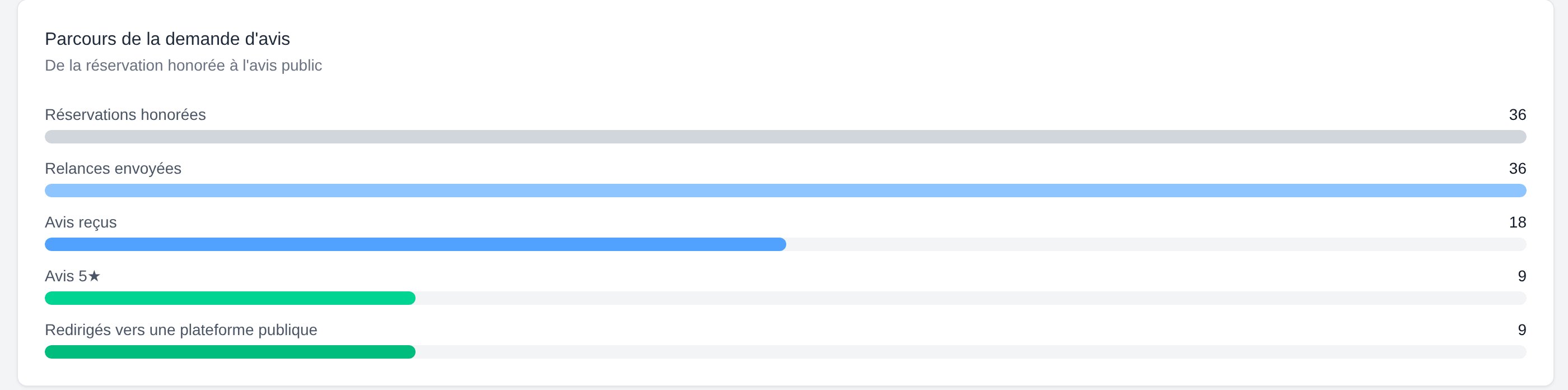
## The review request funnel
 | Step | Meaning |
| ----------------------------------- | ----------------------------------------------------------- |
| **Honoured reservations** | Reservations where the guest actually came, over the period |
| **Follow-ups sent** | Review requests actually sent |
| **Feedbacks received** | Guests who rated their visit |
| **5★ feedbacks** | Ratings that qualified for a public review |
| **Redirected to a public platform** | Guests actually sent to Google or TripAdvisor |
### Reading the drop-offs
Many of your guests were never asked. Usual causes: the follow-up isn't switched on, guests have no email or phone number, or the per-reservation switch is off on your manual bookings. See [Collecting reviews](/reviews/collect).
Guests received the message but didn't rate. Try a shorter delay (a few hours after the meal rather than the next day), and switch WhatsApp on — it's read far more than email.
Guests are answering, but not with a full 5. That's not a settings problem — that's service feedback. Read the comments in **Reviews > Internal feedback**.
Your happiest guests aren't being forwarded anywhere. Check that **Google Reviews** or **TripAdvisor** is enabled in your [review collection channels](/reviews/filtering).
Small differences between the funnel and the headline numbers are expected: the funnel only counts reviews that came from a reservation, while the headline numbers also include QR-code reviews.
| Step | Meaning |
| ----------------------------------- | ----------------------------------------------------------- |
| **Honoured reservations** | Reservations where the guest actually came, over the period |
| **Follow-ups sent** | Review requests actually sent |
| **Feedbacks received** | Guests who rated their visit |
| **5★ feedbacks** | Ratings that qualified for a public review |
| **Redirected to a public platform** | Guests actually sent to Google or TripAdvisor |
### Reading the drop-offs
Many of your guests were never asked. Usual causes: the follow-up isn't switched on, guests have no email or phone number, or the per-reservation switch is off on your manual bookings. See [Collecting reviews](/reviews/collect).
Guests received the message but didn't rate. Try a shorter delay (a few hours after the meal rather than the next day), and switch WhatsApp on — it's read far more than email.
Guests are answering, but not with a full 5. That's not a settings problem — that's service feedback. Read the comments in **Reviews > Internal feedback**.
Your happiest guests aren't being forwarded anywhere. Check that **Google Reviews** or **TripAdvisor** is enabled in your [review collection channels](/reviews/filtering).
Small differences between the funnel and the headline numbers are expected: the funnel only counts reviews that came from a reservation, while the headline numbers also include QR-code reviews.