> ## Documentation Index
> Fetch the complete documentation index at: https://docs.eat-now.io/llms.txt
> Use this file to discover all available pages before exploring further.
# Reading your reports
> Every launched campaign gets a report — a prospect funnel, detailed statistics, a per-recipient table, and a way to retry what failed.
Open any launched campaign and the **Report** tab is what you land on. It answers three questions, in this order: *how far did people get?*, *what are the exact numbers?*, and *what happened to this specific customer?*
A campaign that is still a **Draft** has no report yet — you'll see "Reports become available once the campaign has been launched or scheduled."
## The audience header
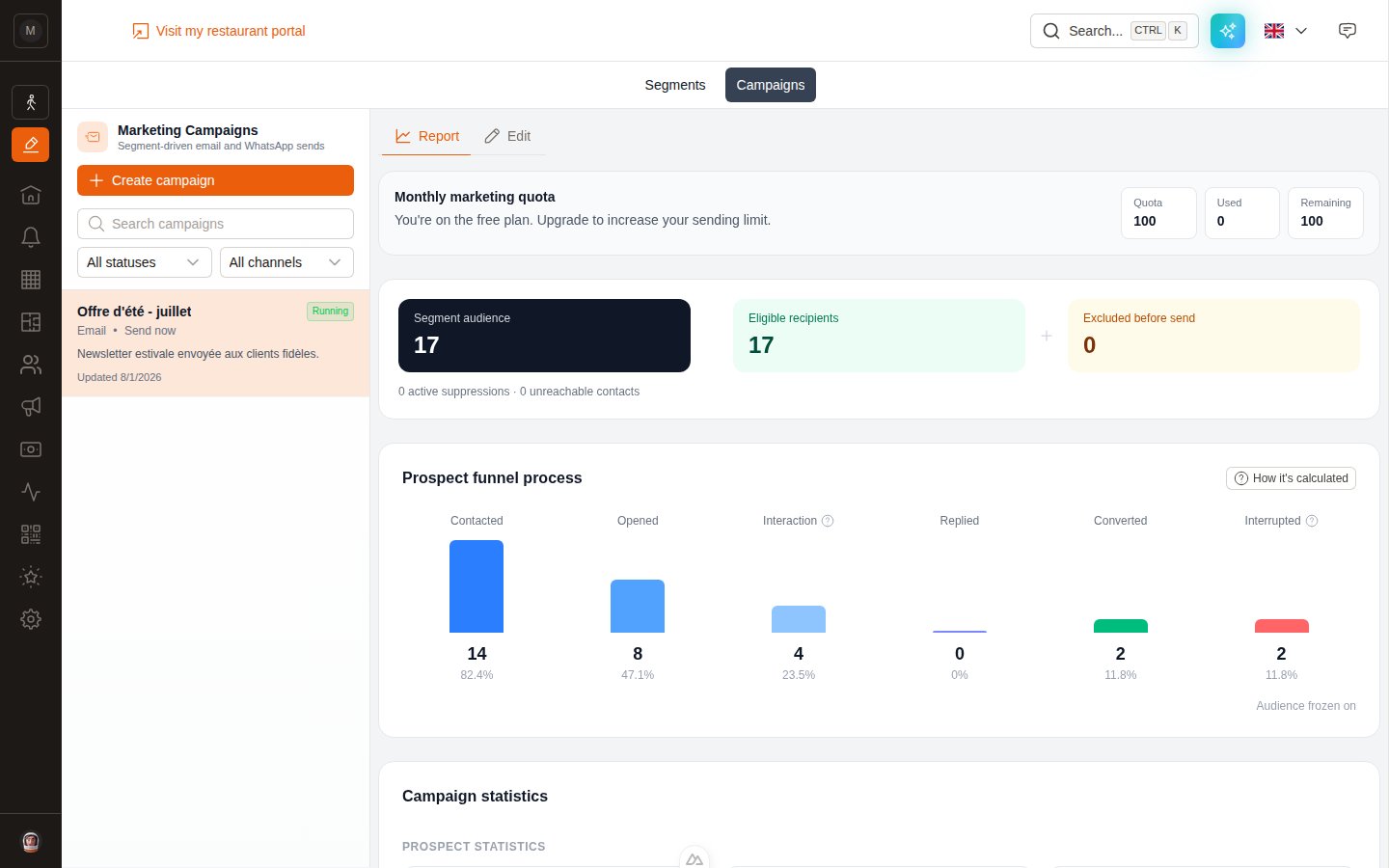 Three boxes at the top:
* **Segment audience** — everyone the segment matched at launch.
* **Eligible recipients** — the ones actually sent to.
* **Excluded before send** — the difference, broken down underneath into *active suppressions* and *unreachable contacts*.
The frozen date is shown as **Audience frozen on …** — that's the moment the recipient list was locked.
## The prospect funnel
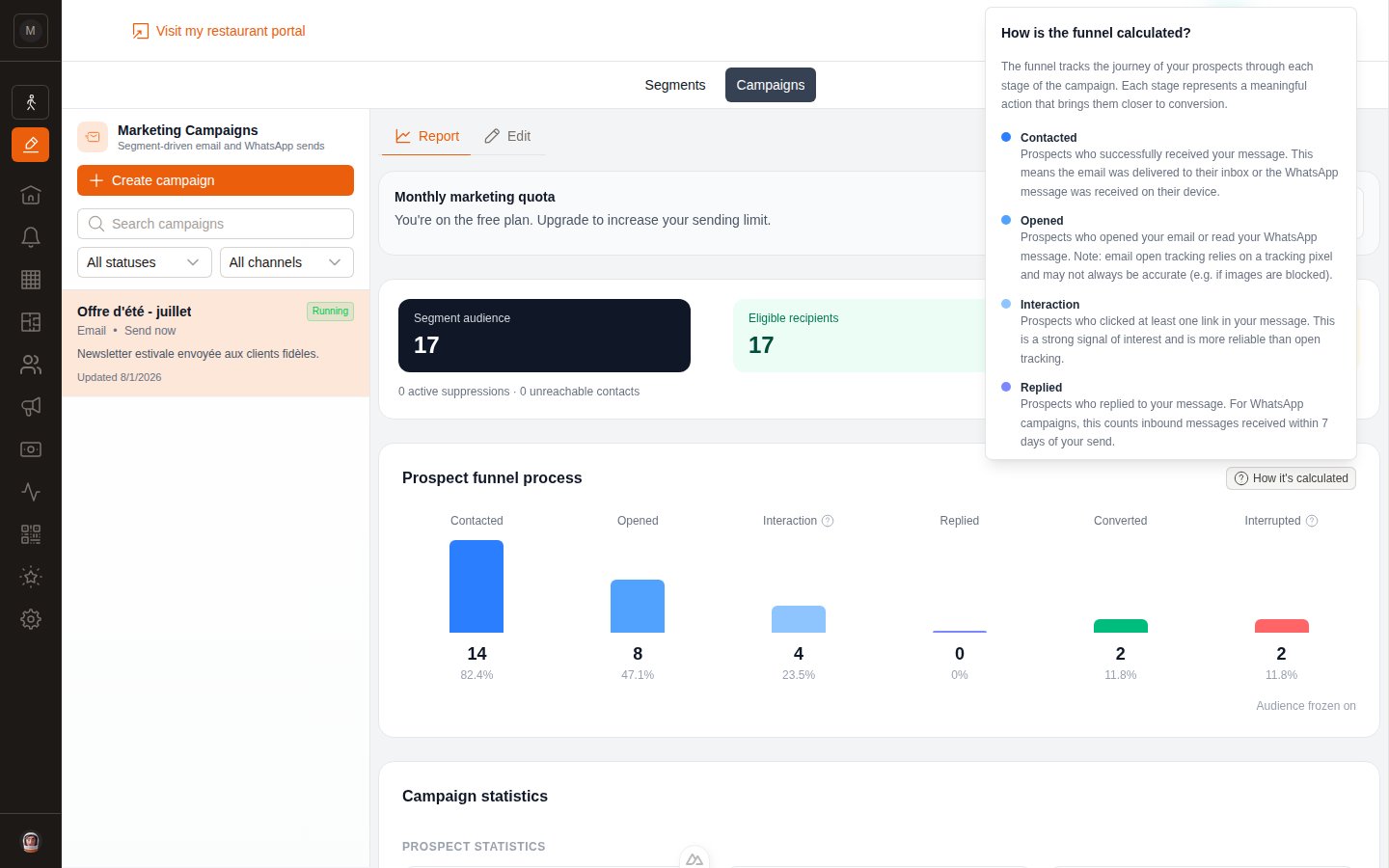
Six stages, each with a count and a percentage **of eligible recipients**.
| Stage | Counts a prospect who… |
| --------------- | ---------------------------------------------------------------------------------------- |
| **Contacted** | Received your message — email delivered to the inbox, or WhatsApp received on the device |
| **Opened** | Opened the email, or read the WhatsApp message |
| **Interaction** | Clicked at least one link in the message |
| **Replied** | Replied to the message (WhatsApp only, within 7 days) |
| **Converted** | Made a booking — reservation or activity — attributed to this campaign |
| **Interrupted** | Bounced, complained, unsubscribed, or failed to be delivered |
The **How it's calculated** button opens a panel that explains each stage in the app itself.
Three boxes at the top:
* **Segment audience** — everyone the segment matched at launch.
* **Eligible recipients** — the ones actually sent to.
* **Excluded before send** — the difference, broken down underneath into *active suppressions* and *unreachable contacts*.
The frozen date is shown as **Audience frozen on …** — that's the moment the recipient list was locked.
## The prospect funnel
Six stages, each with a count and a percentage **of eligible recipients**.
| Stage | Counts a prospect who… |
| --------------- | ---------------------------------------------------------------------------------------- |
| **Contacted** | Received your message — email delivered to the inbox, or WhatsApp received on the device |
| **Opened** | Opened the email, or read the WhatsApp message |
| **Interaction** | Clicked at least one link in the message |
| **Replied** | Replied to the message (WhatsApp only, within 7 days) |
| **Converted** | Made a booking — reservation or activity — attributed to this campaign |
| **Interrupted** | Bounced, complained, unsubscribed, or failed to be delivered |
The **How it's calculated** button opens a panel that explains each stage in the app itself.
 **Open rate is the least trustworthy number on this page.** It relies on a tracking pixel, and mail clients that block images (or pre-load them) will under- or over-count it. Clicks, replies and conversions are the metrics to steer by.
## How conversions are attributed
This is the number that tells you whether the campaign was worth it, so it's worth knowing the rule:
> A booking counts as a conversion if the customer books **within 7 days** of receiving the campaign.
* If the customer **clicked a tracked link** before booking, the conversion is recorded as **click-attributed**.
* Otherwise it is **send-attributed**.
* If both apply, click attribution wins.
**Attributed revenue** adds up the value of those bookings.
## Campaign statistics
**Open rate is the least trustworthy number on this page.** It relies on a tracking pixel, and mail clients that block images (or pre-load them) will under- or over-count it. Clicks, replies and conversions are the metrics to steer by.
## How conversions are attributed
This is the number that tells you whether the campaign was worth it, so it's worth knowing the rule:
> A booking counts as a conversion if the customer books **within 7 days** of receiving the campaign.
* If the customer **clicked a tracked link** before booking, the conversion is recorded as **click-attributed**.
* Otherwise it is **send-attributed**.
* If both apply, click attribution wins.
**Attributed revenue** adds up the value of those bookings.
## Campaign statistics
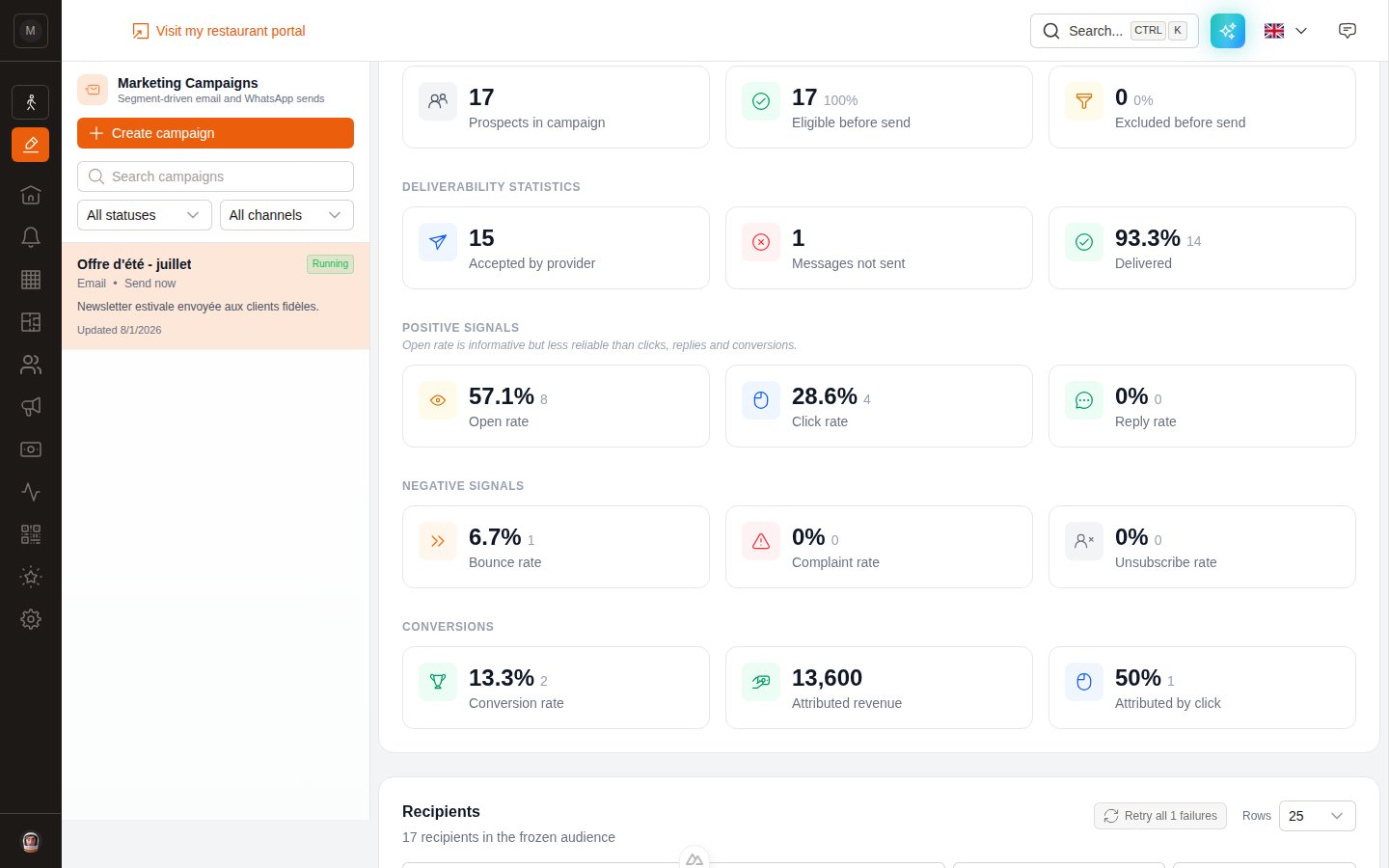 * **Prospects in campaign** — the size of the frozen audience.
* **Eligible before send** — how many were actually sendable.
* **Excluded before send** — suppressed or unreachable.
* **Accepted by provider** — messages the email or WhatsApp provider took charge of.
* **Messages not sent** — failed at the moment of sending.
* **Delivered** — confirmed as reaching the recipient.
**Open rate**, **Click rate**, **Reply rate**. Clicks and replies are the honest ones.
**Bounce rate**, **Complaint rate**, **Unsubscribe rate**. A rising bounce rate means your list needs cleaning; a rising complaint rate means you're sending too often or to the wrong people.
**Conversion rate**, **Attributed revenue**, and **Attributed by click** — the share of conversions where the customer clicked before booking.
## The recipients table
* **Prospects in campaign** — the size of the frozen audience.
* **Eligible before send** — how many were actually sendable.
* **Excluded before send** — suppressed or unreachable.
* **Accepted by provider** — messages the email or WhatsApp provider took charge of.
* **Messages not sent** — failed at the moment of sending.
* **Delivered** — confirmed as reaching the recipient.
**Open rate**, **Click rate**, **Reply rate**. Clicks and replies are the honest ones.
**Bounce rate**, **Complaint rate**, **Unsubscribe rate**. A rising bounce rate means your list needs cleaning; a rising complaint rate means you're sending too often or to the wrong people.
**Conversion rate**, **Attributed revenue**, and **Attributed by click** — the share of conversions where the customer clicked before booking.
## The recipients table
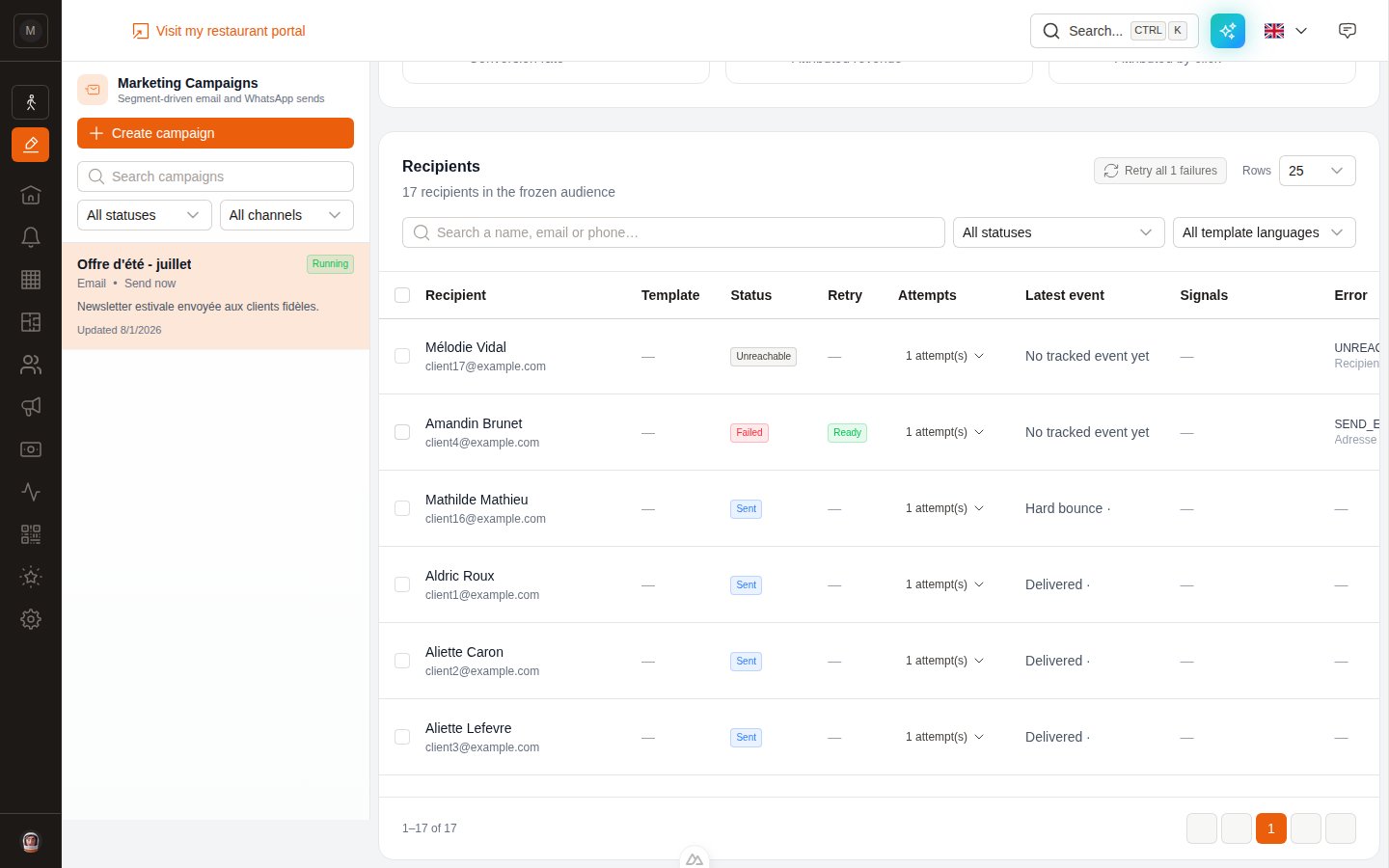 At the bottom of the report, one row per person in the frozen audience.
**Filters:** free-text search (name, email or phone), a status filter, and — for WhatsApp — a template-language filter. You can show 25, 50 or 100 rows per page.
| Column | Shows |
| ---------------- | ------------------------------------------------------------------ |
| **Recipient** | Name and contact detail used |
| **Template** | Which language template they got (WhatsApp) |
| **Status** | See the table below |
| **Retry** | Whether a failure can be retried |
| **Attempts** | How many times we tried — expandable into the full attempt history |
| **Latest event** | Delivered, Opened, Clicked, Hard bounce… |
| **Signals** | Clicked, Replied, Converted |
| **Error** | The provider's error, when there is one |
### Recipient statuses
| Status | Meaning |
| --------------- | ----------------------------------------------------------------------- |
| **Pending** | Waiting in the queue |
| **Processing** | Being sent right now |
| **Sent** | Handed over to the provider |
| **Failed** | The send failed — see the Error column |
| **Unreachable** | No usable email or phone number |
| **Excluded** | An active suppression (unsubscribe, bounce, complaint) blocked the send |
## Retrying failures
Failures happen — a temporary provider glitch, a WhatsApp configuration problem, a mistyped address. You can retry without recreating the campaign.
Available when the campaign is **Completed**, **Failed** or **Paused**.
Tick individual rows, or use **Retry all N failures** at the top of the table.
EatNow sorts the selection into three groups:
| Group | Meaning |
| ----------------------- | --------------------------------------------------------------------------------------------------------------------------------------------------------------------------------------------------- |
| **Ready** | Retry now, nothing to fix |
| **Correction required** | Something must be fixed first — missing WhatsApp template language, inactive integration, missing contact details, a Meta billing problem. Links to the right settings page and guide are provided. |
| **Not recommended** | Retrying is a bad idea — hard bounce, spam complaint, invalid address, or Meta says the number is undeliverable |
For a missing WhatsApp language, pick the template right inside the retry panel. For a Meta configuration error, fix it in your integration then tick the confirmation checkbox.
Click **Retry N recipient(s)**. The frozen audience is unchanged; each new attempt is recorded separately and updates the recipient's current state.
**An active suppression can never be overridden.** A customer who unsubscribed will not be retried, whatever you tick. That's a legal guard, not a setting.
## Next step
Credit every reservation to the platform that generated it — Instagram, Google, TripAdvisor…
Why a campaign pauses itself, and how to keep your list healthy.
Quick answers to the usual questions.
At the bottom of the report, one row per person in the frozen audience.
**Filters:** free-text search (name, email or phone), a status filter, and — for WhatsApp — a template-language filter. You can show 25, 50 or 100 rows per page.
| Column | Shows |
| ---------------- | ------------------------------------------------------------------ |
| **Recipient** | Name and contact detail used |
| **Template** | Which language template they got (WhatsApp) |
| **Status** | See the table below |
| **Retry** | Whether a failure can be retried |
| **Attempts** | How many times we tried — expandable into the full attempt history |
| **Latest event** | Delivered, Opened, Clicked, Hard bounce… |
| **Signals** | Clicked, Replied, Converted |
| **Error** | The provider's error, when there is one |
### Recipient statuses
| Status | Meaning |
| --------------- | ----------------------------------------------------------------------- |
| **Pending** | Waiting in the queue |
| **Processing** | Being sent right now |
| **Sent** | Handed over to the provider |
| **Failed** | The send failed — see the Error column |
| **Unreachable** | No usable email or phone number |
| **Excluded** | An active suppression (unsubscribe, bounce, complaint) blocked the send |
## Retrying failures
Failures happen — a temporary provider glitch, a WhatsApp configuration problem, a mistyped address. You can retry without recreating the campaign.
Available when the campaign is **Completed**, **Failed** or **Paused**.
Tick individual rows, or use **Retry all N failures** at the top of the table.
EatNow sorts the selection into three groups:
| Group | Meaning |
| ----------------------- | --------------------------------------------------------------------------------------------------------------------------------------------------------------------------------------------------- |
| **Ready** | Retry now, nothing to fix |
| **Correction required** | Something must be fixed first — missing WhatsApp template language, inactive integration, missing contact details, a Meta billing problem. Links to the right settings page and guide are provided. |
| **Not recommended** | Retrying is a bad idea — hard bounce, spam complaint, invalid address, or Meta says the number is undeliverable |
For a missing WhatsApp language, pick the template right inside the retry panel. For a Meta configuration error, fix it in your integration then tick the confirmation checkbox.
Click **Retry N recipient(s)**. The frozen audience is unchanged; each new attempt is recorded separately and updates the recipient's current state.
**An active suppression can never be overridden.** A customer who unsubscribed will not be retried, whatever you tick. That's a legal guard, not a setting.
## Next step
Credit every reservation to the platform that generated it — Instagram, Google, TripAdvisor…
Why a campaign pauses itself, and how to keep your list healthy.
Quick answers to the usual questions.