> ## Documentation Index
> Fetch the complete documentation index at: https://docs.eat-now.io/llms.txt
> Use this file to discover all available pages before exploring further.
# Booking inside Google (E2E)
> What guests can book without leaving Google, what Google does not offer, and how cancellations, changes and confirmations flow between Google and EatNow.
In **End-to-End (E2E)** mode, guests book your restaurant without leaving Google Search or Google Maps. EatNow publishes your availability to Google, checks each booking live, and the reservation lands in EatNow like any other. To turn the mode on, see [Reserve with Google](/integrations/google-reserve).
## What the guest sees
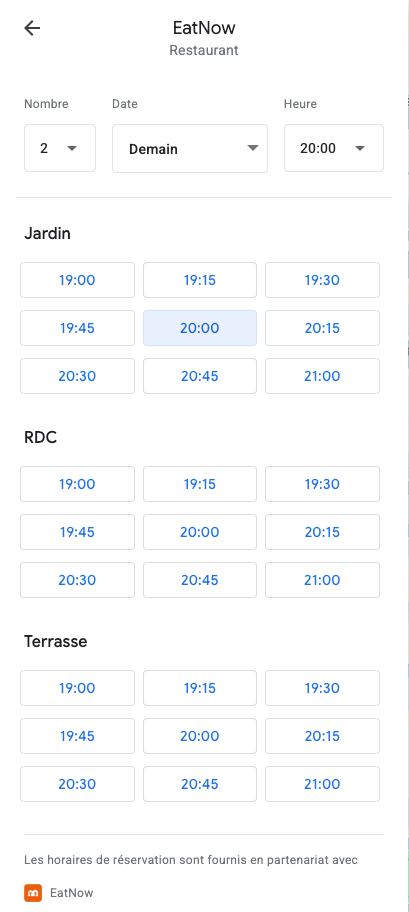 Google shows the times available around the time they ask for. When the shift lets guests choose their room, the times are grouped by **dining area**, under your room names.
Google fills in their name, email and phone number from their Google account. Nothing else is passed on: no message, no allergies, no occasion.
EatNow checks the slot again at that exact moment. The reservation appears in your lists with the source **Reserve with Google**, and the usual notifications go out: confirmation (or "request received") email and WhatsApp to the guest, new-booking notification to your team.
## What Google offers
Google offers the same times as your booking portal, worked out by the same engine:
* your shifts and their **public hours**, days and dates;
* capacity, pacing, closures and table blocks, including the day's adjustments;
* only tables marked **Available for online booking**;
* the [notice period](/shifts/booking-rules#how-close-to-the-meal-notice-period) (each slot closes on Google at its cutoff) and **Limit max reservation in advance**;
* party sizes from the shift's minimum to its maximum, **up to 10 guests**;
* the next **30 days**.
Internal shifts are never published.
## What Google does not offer
| Not available on Google | What happens |
| - | - |
| **Deposit, card imprint, mandatory prepayment** | Google cannot collect a payment. The party sizes that would have to pay are not offered on Google; they stay bookable on your portal. |
| **Formulas, extras, optional prepayment** | Not offered: the booking is created without products. |
| **Groups of more than 10** | Not offered, even if the shift accepts more. They book through the portal or by phone. |
| **Free the tables at a fixed time** | Switched off on every shift when E2E is turned on. |
| **Guest message, allergies** | Google does not pass them on. Add them to the reservation if the guest tells you. |
| **Morocco** | E2E is not available there. Use Business Link. |
If most of your shifts need a deposit or prepayment, **Business Link** is a better fit: the guest goes through your portal and pays there.
## Manual confirmation
When the shift's **Reservation system** is **Manual**, or **Advanced** and the party is above the **Manual threshold**, Google shows the booking as **waiting for the restaurant's confirmation**. The reservation arrives in EatNow as **Pending**. Accept or decline it as usual: Google tells the guest.
A guest cannot change a booking that is still pending. They cancel it and book again.
## After the booking
**From Google**, the guest can:
* **cancel** at any time. The portal's **Allow reservation cancellation** setting and its threshold do not apply to Google bookings;
* **change** the time, date or party size, only if **Allow reservation modification** is on. The new slot is checked like a new booking (availability, notice period, booking window).
**From EatNow**, when you confirm, decline, cancel, move or resize a Google booking, Google is updated and the guest sees the change in their Google booking.
A guest on your [blocked list](/portal/blacklist) is refused. Otherwise the booking is linked to the matching customer file (same email or phone number), or a new file is created.
## How up to date Google is
* **Every morning** at 06:00 UTC (08:00 in Paris in summer, 07:00 in winter), EatNow sends Google the next 30 days.
* **Within about a minute** of a change to your shifts, closures, rooms, tables, table blocks or the day's adjustments, EatNow sends Google the new availability.
* Bookings made on your other channels (portal, phone, walk-ins, WhatsApp) are not sent to Google one by one. Google may therefore still show a slot that has just filled up. When the guest picks it, EatNow checks again and Google tells them it is no longer available.
* **New** days and times (a day entering the 30-day window, hours you add to a shift) appear on Google **the next day**. Changes to existing times, such as a closure or a notice period, show the same day.
## Troubleshooting
Check that the shift is open that day on your portal. Then check the shift's payment settings: if every party size needs a deposit or prepayment, nothing is offered on Google. If you have just added the day or the hours, wait until the next day.
The slot filled up through another channel since Google last received your availability. EatNow always checks live before creating the booking, so no overbooking is possible.
Google stops at 10 guests. Larger groups book through your portal or by phone.
Expected: Google always lets guests cancel. The portal's cancellation setting only covers the portal, emails and the WhatsApp agent.
This documentation is built and hosted on [Mintlify](https://mintlify.com), a developer documentation platform.
Google shows the times available around the time they ask for. When the shift lets guests choose their room, the times are grouped by **dining area**, under your room names.
Google fills in their name, email and phone number from their Google account. Nothing else is passed on: no message, no allergies, no occasion.
EatNow checks the slot again at that exact moment. The reservation appears in your lists with the source **Reserve with Google**, and the usual notifications go out: confirmation (or "request received") email and WhatsApp to the guest, new-booking notification to your team.
## What Google offers
Google offers the same times as your booking portal, worked out by the same engine:
* your shifts and their **public hours**, days and dates;
* capacity, pacing, closures and table blocks, including the day's adjustments;
* only tables marked **Available for online booking**;
* the [notice period](/shifts/booking-rules#how-close-to-the-meal-notice-period) (each slot closes on Google at its cutoff) and **Limit max reservation in advance**;
* party sizes from the shift's minimum to its maximum, **up to 10 guests**;
* the next **30 days**.
Internal shifts are never published.
## What Google does not offer
| Not available on Google | What happens |
| - | - |
| **Deposit, card imprint, mandatory prepayment** | Google cannot collect a payment. The party sizes that would have to pay are not offered on Google; they stay bookable on your portal. |
| **Formulas, extras, optional prepayment** | Not offered: the booking is created without products. |
| **Groups of more than 10** | Not offered, even if the shift accepts more. They book through the portal or by phone. |
| **Free the tables at a fixed time** | Switched off on every shift when E2E is turned on. |
| **Guest message, allergies** | Google does not pass them on. Add them to the reservation if the guest tells you. |
| **Morocco** | E2E is not available there. Use Business Link. |
If most of your shifts need a deposit or prepayment, **Business Link** is a better fit: the guest goes through your portal and pays there.
## Manual confirmation
When the shift's **Reservation system** is **Manual**, or **Advanced** and the party is above the **Manual threshold**, Google shows the booking as **waiting for the restaurant's confirmation**. The reservation arrives in EatNow as **Pending**. Accept or decline it as usual: Google tells the guest.
A guest cannot change a booking that is still pending. They cancel it and book again.
## After the booking
**From Google**, the guest can:
* **cancel** at any time. The portal's **Allow reservation cancellation** setting and its threshold do not apply to Google bookings;
* **change** the time, date or party size, only if **Allow reservation modification** is on. The new slot is checked like a new booking (availability, notice period, booking window).
**From EatNow**, when you confirm, decline, cancel, move or resize a Google booking, Google is updated and the guest sees the change in their Google booking.
A guest on your [blocked list](/portal/blacklist) is refused. Otherwise the booking is linked to the matching customer file (same email or phone number), or a new file is created.
## How up to date Google is
* **Every morning** at 06:00 UTC (08:00 in Paris in summer, 07:00 in winter), EatNow sends Google the next 30 days.
* **Within about a minute** of a change to your shifts, closures, rooms, tables, table blocks or the day's adjustments, EatNow sends Google the new availability.
* Bookings made on your other channels (portal, phone, walk-ins, WhatsApp) are not sent to Google one by one. Google may therefore still show a slot that has just filled up. When the guest picks it, EatNow checks again and Google tells them it is no longer available.
* **New** days and times (a day entering the 30-day window, hours you add to a shift) appear on Google **the next day**. Changes to existing times, such as a closure or a notice period, show the same day.
## Troubleshooting
Check that the shift is open that day on your portal. Then check the shift's payment settings: if every party size needs a deposit or prepayment, nothing is offered on Google. If you have just added the day or the hours, wait until the next day.
The slot filled up through another channel since Google last received your availability. EatNow always checks live before creating the booking, so no overbooking is possible.
Google stops at 10 guests. Larger groups book through your portal or by phone.
Expected: Google always lets guests cancel. The portal's cancellation setting only covers the portal, emails and the WhatsApp agent.
This documentation is built and hosted on [Mintlify](https://mintlify.com), a developer documentation platform.