> ## Documentation Index
> Fetch the complete documentation index at: https://docs.eat-now.io/llms.txt
> Use this file to discover all available pages before exploring further.
# Safety & Controls
> The guardrails that keep your AI agent safe and on-brand — automatic safety rules, a block list, and the credits that meter its usage.
The agent comes with strong guardrails out of the box, and gives you room to add your own. This page covers the three controls that keep it safe: **safety rules**, the **block list**, and **credits**.
## Safety rules
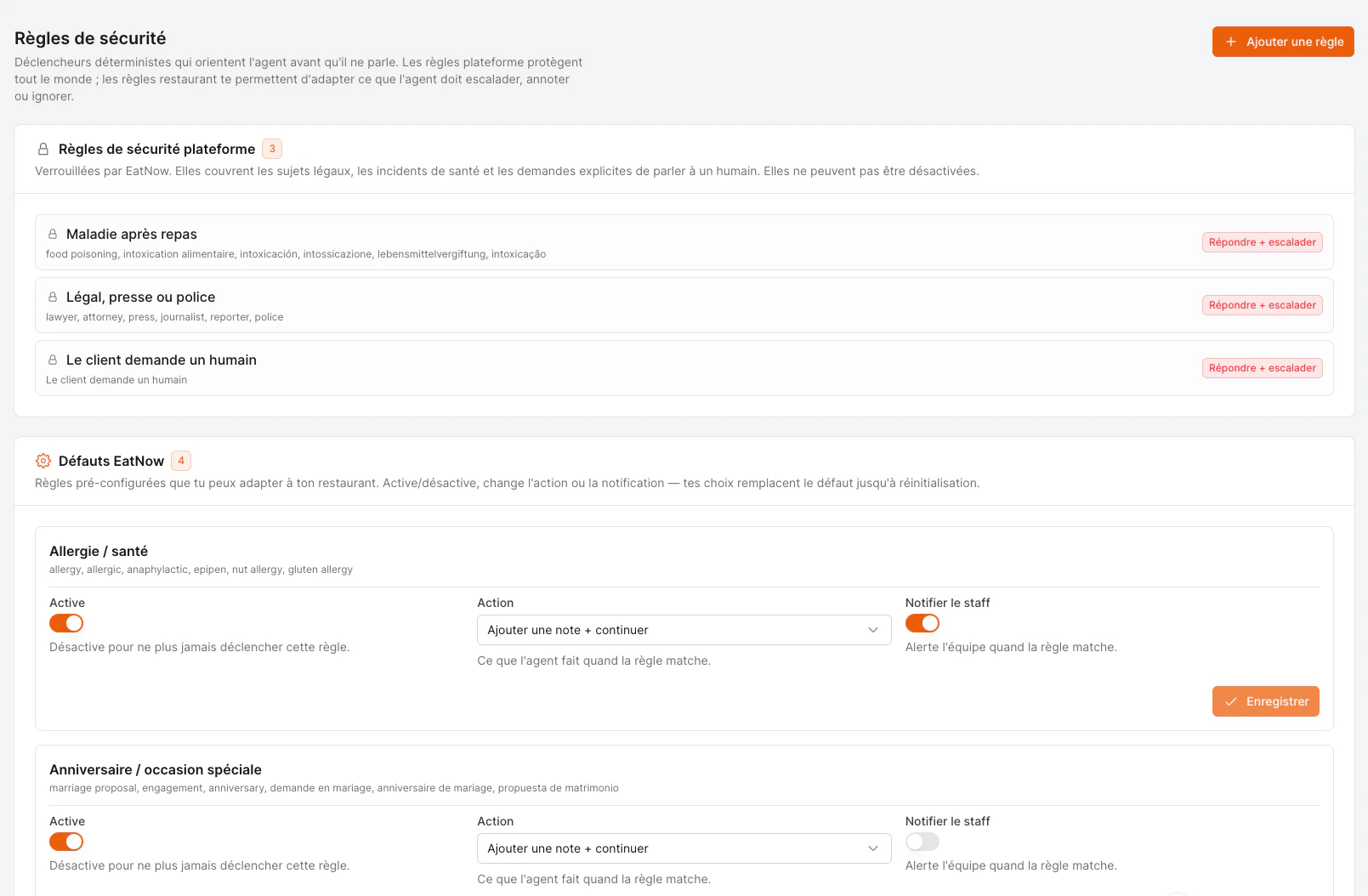
Find them under **Settings → AI Agent → Safety rules**. These are *deterministic* triggers — they catch specific situations and decide what the agent should do **before** it ever replies. They come in three layers.
 ### Platform safety rules (locked)
These protect every restaurant and **can't be disabled**. They cover the situations where an AI should never improvise:
* **Allergy / health mention**
* **Illness after dining**
* **Legal, press, or police**
* **Customer asks for a human**
When any of these come up, the agent sends a brief, careful reply and immediately hands the conversation to your team.
### EatNow defaults (you can tune them)
Pre-configured rules for common situations you might want to handle your own way — for example *anniversaries*, *VIP / privatisation requests*, or a *repeat no-show customer*. For each, you can:
* **Turn it on or off.**
* **Change the action** (see the table below).
* **Toggle staff notification** — whether your team gets pinged when it matches.
Your choices override the default until you hit **Reset to default**.
### Your custom rules
Add your own triggers for anything specific to your restaurant. Match on **keywords** (e.g. *terrace, outside*) and tell the agent exactly how to react.
### What can the agent do when a rule matches?
| Action | What the agent does |
| ----------------------- | ---------------------------------------------------------------------------- |
| **Reply + escalate** | Sends a polite holding reply, then hands off to a human. |
| **Silent escalate** | Steps back without replying; your team picks it up from the inbox. |
| **Continue** | Carries on normally, as if nothing matched. |
| **Add note + continue** | Keeps going **and** attaches a note to the booking so staff sees the signal. |
| **Ask a question** | Asks one clarifying question before doing any booking or change. |
| **Ignore** | Suppresses the match — handy to silence a rule for one restaurant. |
A great use of **Add note + continue**: a rule on *"birthday, anniversary"* lets the agent keep taking the booking while quietly flagging the occasion on the reservation, so your team can prepare something special.
## Block list
Some contacts you simply never want the agent to engage — a difficult number, a spammer, a supplier. Add them to the **block list** (**Settings → AI Agent → Block list**) and the agent will never reply to or react to them.
* Add a number in international format (e.g. `+212600000000`).
* The contact stays in your normal inbox — **only the agent** ignores them. This is *not* the customer blacklist.
* Remove a contact any time with **Allow again**.
## Credits
Credits are how the agent's usage is metered — each reply consumes a small amount. You'll see your balance at the top of the AI Agent page.
| State | What it means |
| ------------------------------------ | ---------------------------------------------------------------------------------------------------------------------------------------------------------------- |
| **Healthy balance** | The agent works normally. |
| **Running low** (badge turns orange) | A good time to top up so service isn't interrupted. |
| **Zero** (badge turns red) | The agent stops replying on its own and **hands every conversation to your team** instead — your customers are never left unanswered, but you'll want to top up. |
To add credits, reach out to your EatNow contact. Topping up **adds** to your balance — it never resets what you already have.
Translating a draft reply so you can read it (see [Reviewing conversations](/ai-agent/reviewing-conversations#translate-a-reply)) is **free** and never touches your credits.
### Platform safety rules (locked)
These protect every restaurant and **can't be disabled**. They cover the situations where an AI should never improvise:
* **Allergy / health mention**
* **Illness after dining**
* **Legal, press, or police**
* **Customer asks for a human**
When any of these come up, the agent sends a brief, careful reply and immediately hands the conversation to your team.
### EatNow defaults (you can tune them)
Pre-configured rules for common situations you might want to handle your own way — for example *anniversaries*, *VIP / privatisation requests*, or a *repeat no-show customer*. For each, you can:
* **Turn it on or off.**
* **Change the action** (see the table below).
* **Toggle staff notification** — whether your team gets pinged when it matches.
Your choices override the default until you hit **Reset to default**.
### Your custom rules
Add your own triggers for anything specific to your restaurant. Match on **keywords** (e.g. *terrace, outside*) and tell the agent exactly how to react.
### What can the agent do when a rule matches?
| Action | What the agent does |
| ----------------------- | ---------------------------------------------------------------------------- |
| **Reply + escalate** | Sends a polite holding reply, then hands off to a human. |
| **Silent escalate** | Steps back without replying; your team picks it up from the inbox. |
| **Continue** | Carries on normally, as if nothing matched. |
| **Add note + continue** | Keeps going **and** attaches a note to the booking so staff sees the signal. |
| **Ask a question** | Asks one clarifying question before doing any booking or change. |
| **Ignore** | Suppresses the match — handy to silence a rule for one restaurant. |
A great use of **Add note + continue**: a rule on *"birthday, anniversary"* lets the agent keep taking the booking while quietly flagging the occasion on the reservation, so your team can prepare something special.
## Block list
Some contacts you simply never want the agent to engage — a difficult number, a spammer, a supplier. Add them to the **block list** (**Settings → AI Agent → Block list**) and the agent will never reply to or react to them.
* Add a number in international format (e.g. `+212600000000`).
* The contact stays in your normal inbox — **only the agent** ignores them. This is *not* the customer blacklist.
* Remove a contact any time with **Allow again**.
## Credits
Credits are how the agent's usage is metered — each reply consumes a small amount. You'll see your balance at the top of the AI Agent page.
| State | What it means |
| ------------------------------------ | ---------------------------------------------------------------------------------------------------------------------------------------------------------------- |
| **Healthy balance** | The agent works normally. |
| **Running low** (badge turns orange) | A good time to top up so service isn't interrupted. |
| **Zero** (badge turns red) | The agent stops replying on its own and **hands every conversation to your team** instead — your customers are never left unanswered, but you'll want to top up. |
To add credits, reach out to your EatNow contact. Topping up **adds** to your balance — it never resets what you already have.
Translating a draft reply so you can read it (see [Reviewing conversations](/ai-agent/reviewing-conversations#translate-a-reply)) is **free** and never touches your credits.